brewOS

It follows the beer.

From the recipe, through brew day and the cellar, into packaging and the cold room, and out the door to a customer — and it plans what to brew so the orders you've promised can be made in the tanks you actually own.

  1. RecipeThe targets the beer is judged against
  2. Brew dayMash to knockout, logged against the recipe
  3. CellarReadings, additions, one clock from the pitch
  4. PackagingTank lot, runs, and the lot number each run carries
  5. Cold roomEvery keg, lot by lot, with its age in days
  6. CustomerClosed lot by lot, fulfilled or short

The recipe

The whole beer, written in the order you brew it: the grist, the mash, the lauter, the boil, the whirlpool, the knockout and the fermentation. The numbers move while you write — ABV and apparent attenuation from your own gravity targets, predicted color and bitterness, and the liquor balance from strike through to what goes into the fermenter.

Style ranges from the BJCP and the Brewers Association sit beside your own. Write house styles with your own numbers when the guidelines aren't the point.

Send it to your head brewer. They approve it, or send it back with a note. An approved recipe is never changed in place — to change it you make version two, and last year's batches still say they were brewed to version one.

A brewer's note — watch the mash temperature — can still be added to an approved recipe without pushing the whole thing back through approval.

Later, that recipe shows you what its brews actually did — original and final gravity against target, attenuation, ABV, brewhouse yield and the days each beer spent in each stage, brew by brew, every version. Nothing extra to fill in. It's the brew-day log, read back.
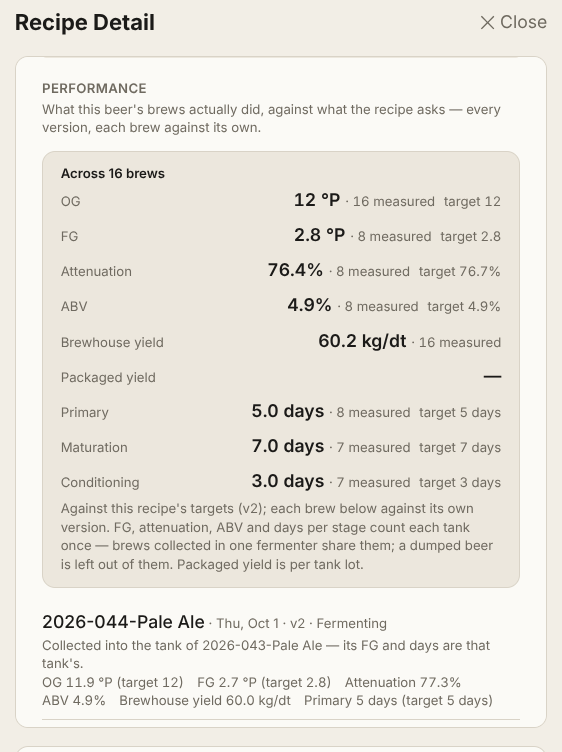
A recipe's performance panel: original and final gravity, attenuation, ABV, brewhouse yield and days per stage across sixteen brews, each figure stating how many brews it is measured from
Every figure says how many brews it's measured from. Eight brews behind the attenuation, sixteen behind the yield — so you know how much weight each number can carry.

The mash says how it gets there

Every step after mash-in states how it reaches its temperature. Heating, at a rate you can type. A hot-water infusion — and BrewOS works out how much and shows you the arithmetic, so you can check it rather than trust it. A decoction returned. An adjunct mash added.

Single, double, triple decoction. Each one thick or thin, with its own rests and its own boil, and the temperature it goes back at is yours to type — never assumed to be 100 °C. At 1,500 metres a decoction boils at about 95 °C. A decoction that comes back cooler doesn't hit the step, and a system that fills in boiling on your behalf has quietly changed your mash.

BrewOS works the pull out from your own numbers and shows that too, and names the largest pull so you can check it against the mash kettle.

Brewing with rice or maize? The cereal mash gets its own program and its own water, timed backwards from the addition, so the screen tells you when to start it. The adjuncts' share of grist and extract is stated, and the gelatinisation temperature sits beside it, checked against the range of the product you actually bought.

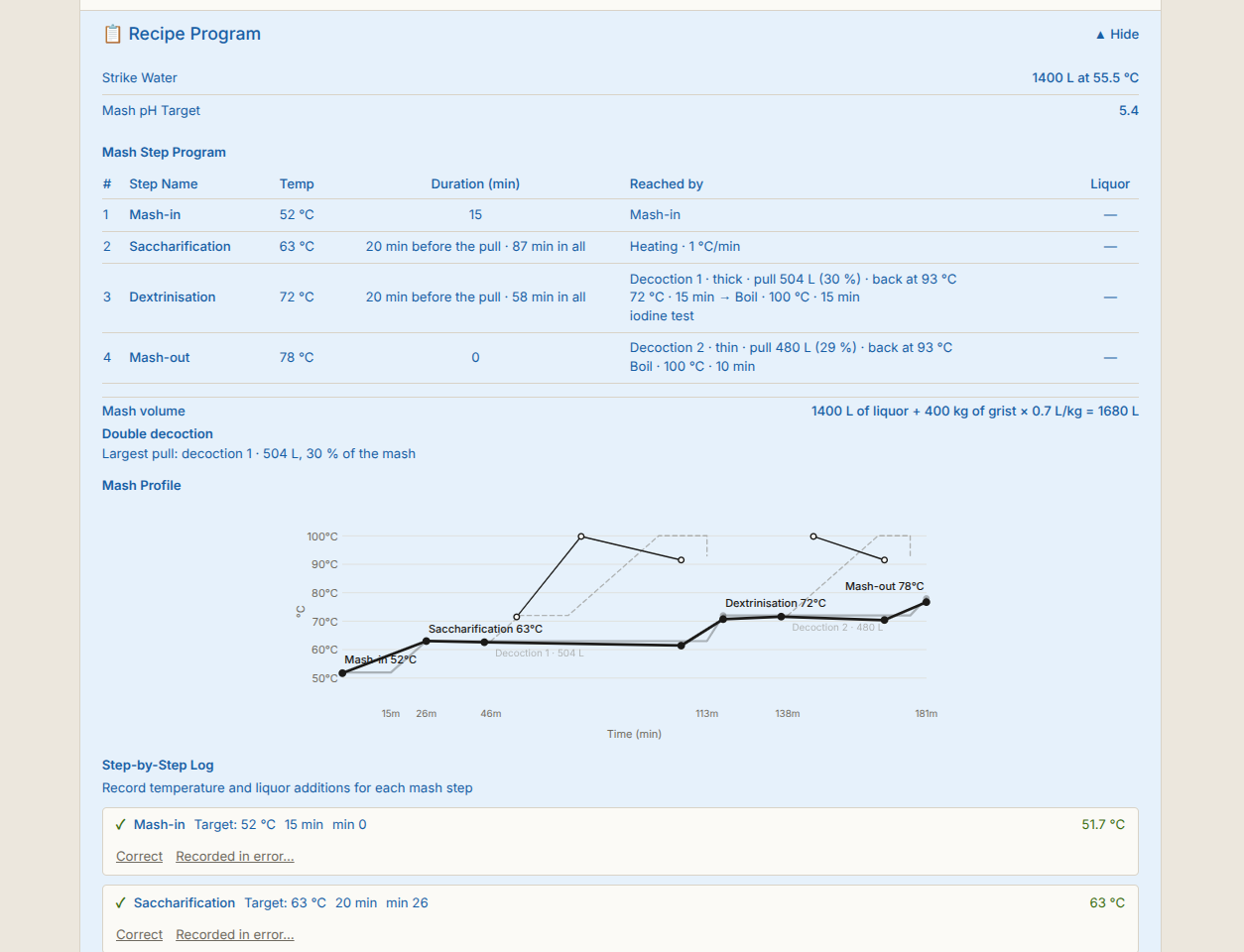
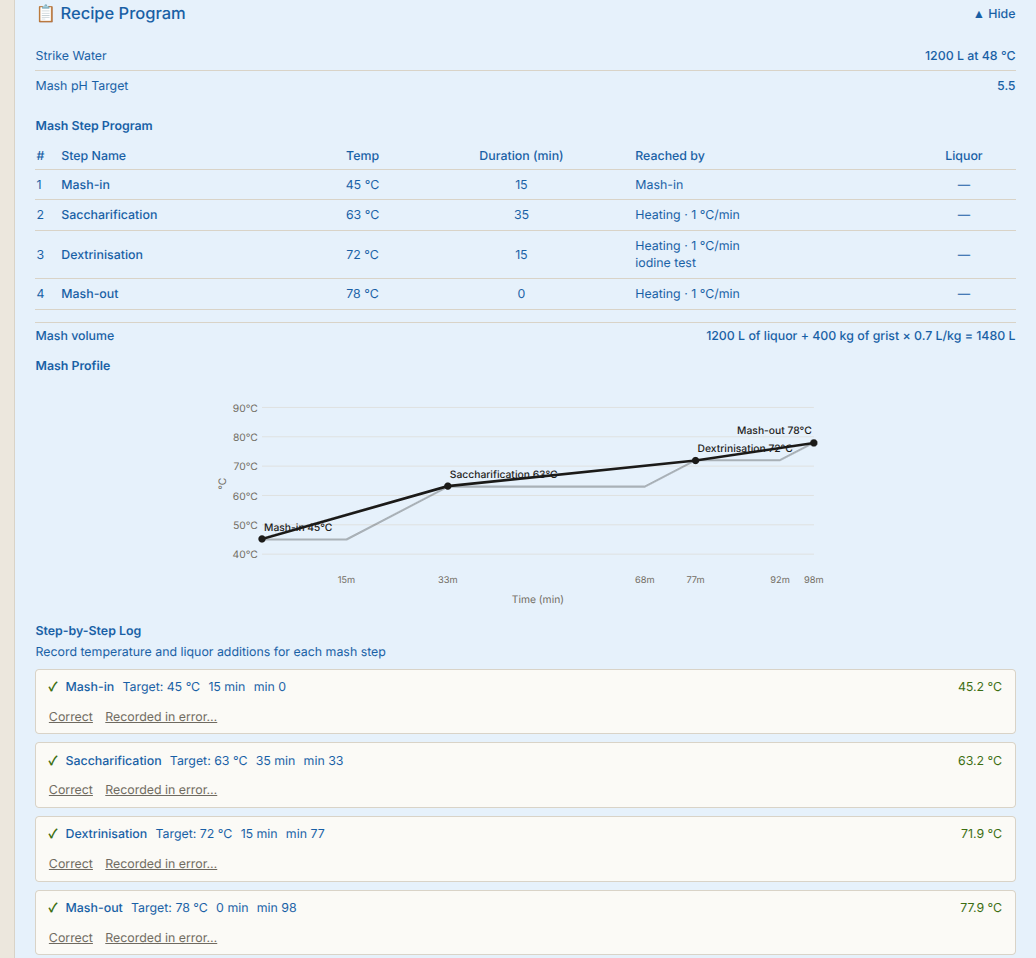
The chart draws exactly what you wrote — the climbs at your rates, each decoction and the cereal mash on their own lines. Then on brew day, what really happened is drawn over it. A step you didn't log is a gap, not a line through a number nobody took.

A mash step program with each step's temperature, hold and how it is reached — heating at 1 °C per minute — above a mash profile chart where the recipe's stepped programme is drawn in grey and the mash that actually ran is drawn over it in black, and below both a step-by-step log giving each step's target and the temperature recorded against it
The recipe's programme in grey, the mash that actually ran drawn over it. Every step says how it reaches its temperature — here heating at 1 °C a minute, the textbook rate — and the log beneath gives each target and what was recorded against it, every entry correctable.
A recipe's mash step program: every step with the temperature it reaches and how it gets there, the two decoctions with their pull volumes and return temperatures, and below it a mash profile chart drawing the main mash and both pulls
A double decoction, as the recipe states it. Both pulls worked out — the larger one 504 litres, 30% of the mash — and each going back at the temperature the brewer typed, not at an assumed boil.

Brew day

Five points on brew day where you log what happened — the mash, the lauter, the boil, the whirlpool, the knockout — each showing the variance against what the recipe said, as you log it.

Every mash rest logged at the temperature the mash actually hit, with the liquor added for each step. The lauter log keeps eight things as the run-off goes:

  • Differential pressure
  • Flow
  • Bed cuts (rakes)
  • Wort gravity (°P)
  • Temperature
  • Turbidity
  • pH
  • Run-off volume

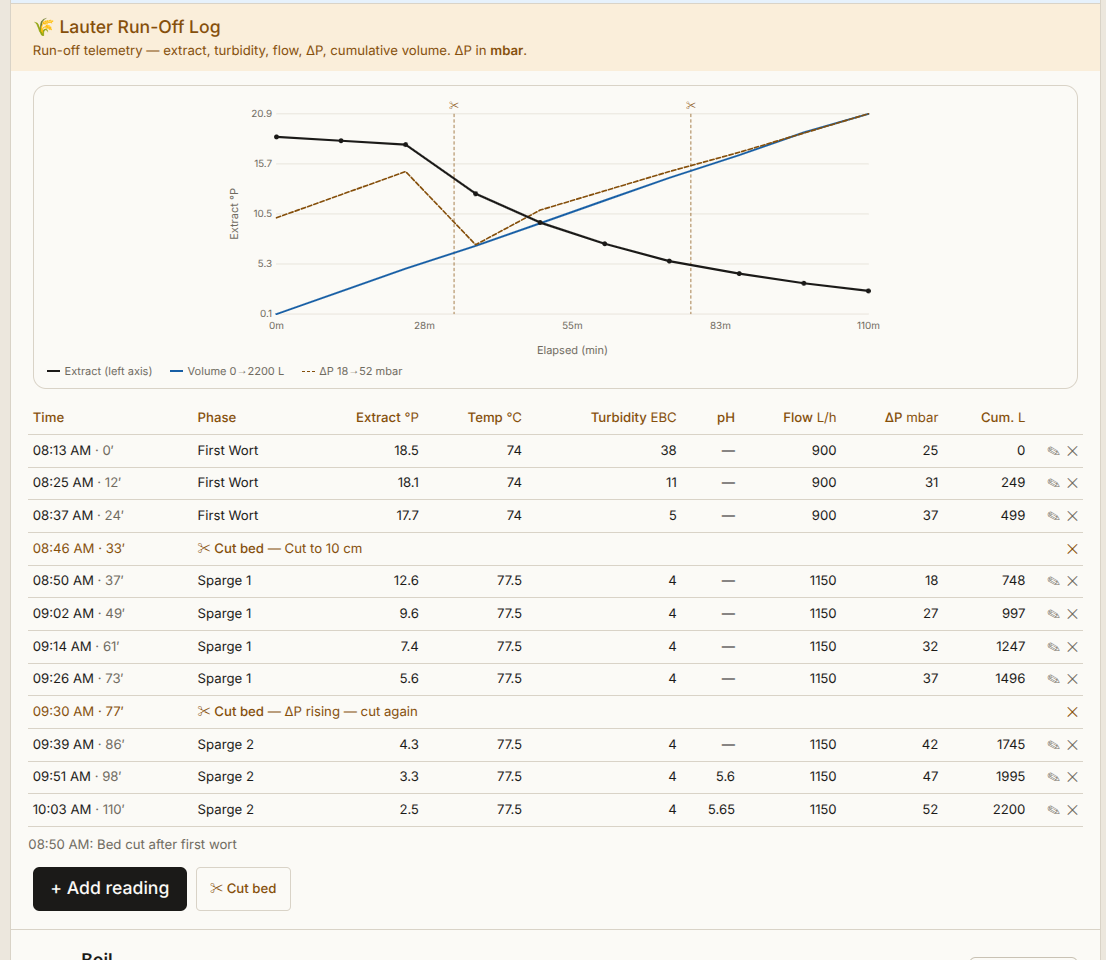
Past three readings it draws the run-off: extract against time, volume and pressure difference alongside, each bed cut marked. It draws only what you logged. With fewer readings it says so and asks for a few more, rather than drawing a line through points nobody took.

A gravity, temperature or pH outside any sane range is refused before it saves — that's a typing slip, not a judgment. A whirlpool at 83 °C is flagged and kept, because that one really happens and the log exists to catch it.

After the lauter: kettle-full gravity and volume against target. After knockout: brewhouse yield, actual original gravity against target, predicted ABV against target.

You pick the fermenter at knockout, from what's actually free — fermenters first, the one the plan had marked, then the rest, still choosable. A tank too small for the beer is the only refusal.

Brewed yesterday and typing it up this morning? It asks which day it was instead of stamping today. Knocked out into the wrong tank? Fix it on the same screen while the beer is still in primary — the beer goes where it really is, the first tank goes back to ready, and the history says who corrected it.

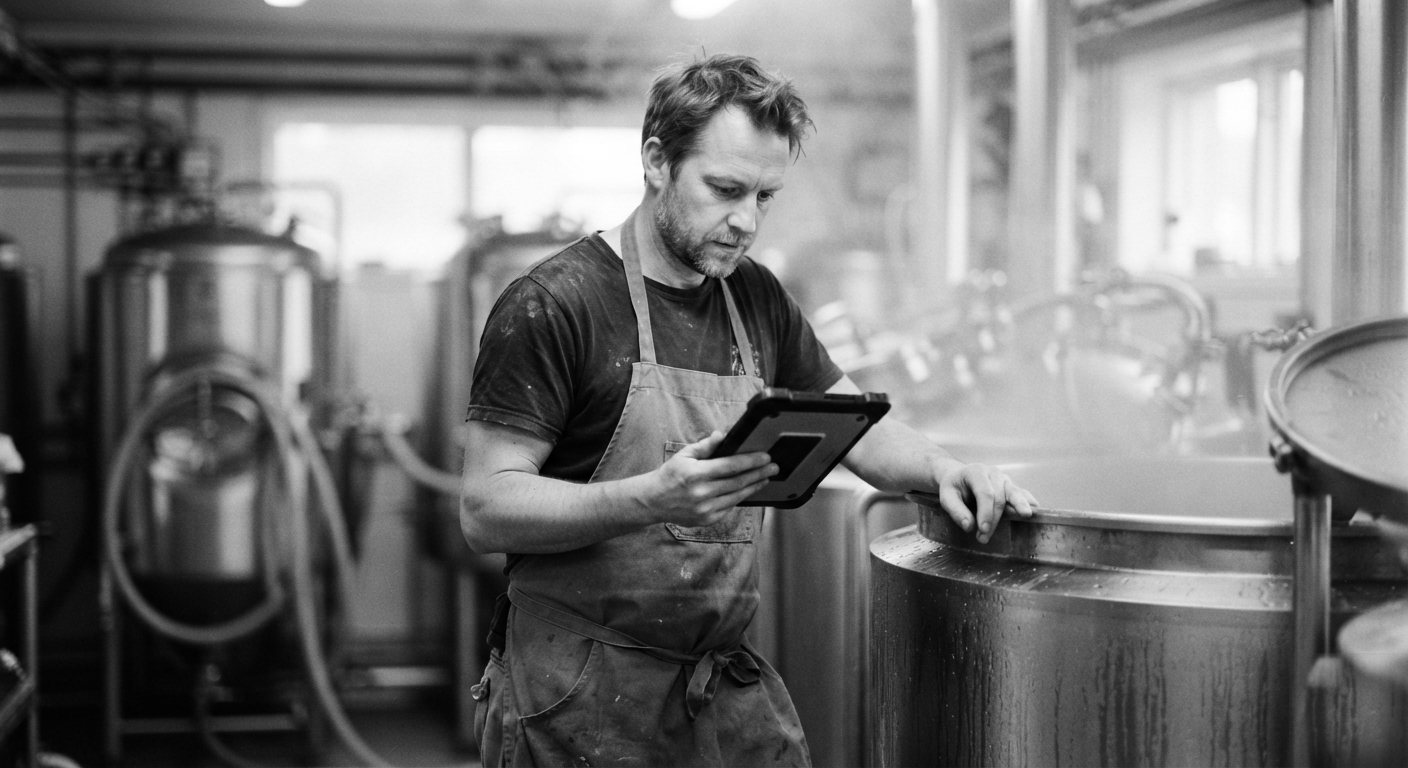
A brewer logging the mash on a tablet at the mash tun
The lauter run-off log: a curve of extract falling against time with run-off volume and pressure difference alongside, both bed cuts marked, above the table of readings behind it
The run-off, drawn from the readings behind it. Both bed cuts marked where they happened — the second one because the pressure difference was climbing.

The cellar

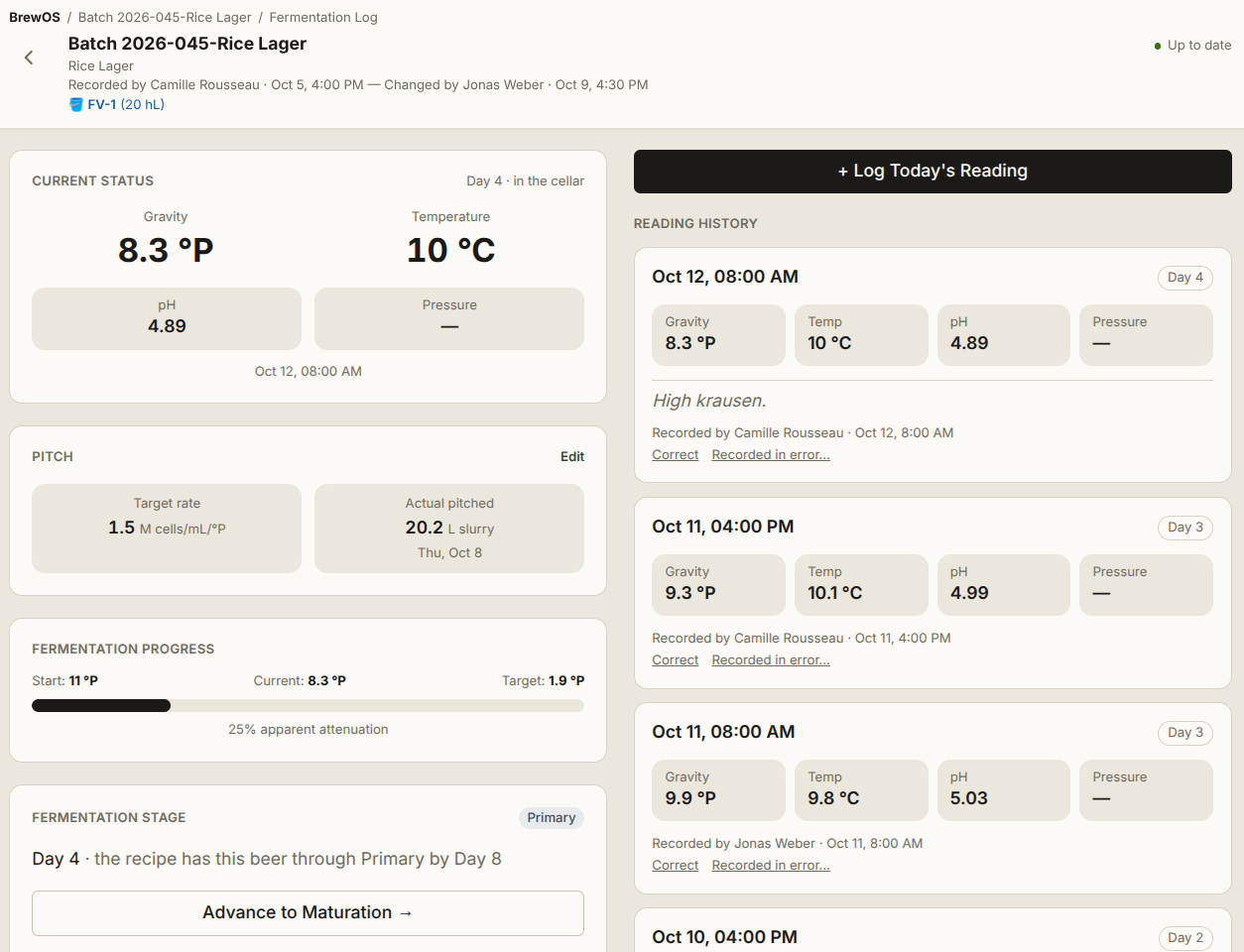
Day 0 is the pitch, and the clock doesn't start again when the beer advances a stage. It's time in the cellar whether the beer is in primary, maturation or conditioning — which is what makes day 11 · the recipe had this beer through primary by day 9 mean something.

Readings from a phone at the tank. The pitch. Cellar additions and a dry-hop checklist. Stage advances. Tank moves with a reason. An attenuation bar against the recipe's target.

Before you advance a stage it tells you the current gravity and the target, and then lets you advance. You know things it doesn't.

And it opens on the tanks that need you. No reading for two days in primary. A temperature more than 2 °C off what the recipe asks for that stage. A ferment that's dropped less than 0.2 °P over two days and three readings while it's still well short of its final gravity. Where a recipe states no target, it raises nothing rather than inventing one.

Moving a beer into conditioning? It asks for the forced diacetyl test first and keeps your answer on the record. Butter in a finished lager is one of the most avoidable faults there is, and the test costs a warmed sample and half an hour.

A dump is a dump. It's recorded with its reason, confirmed by the brewmaster or head brewer, and never edited or deleted afterwards. A beer leaves the cellar once — packaged or dumped — and either way it's written down.

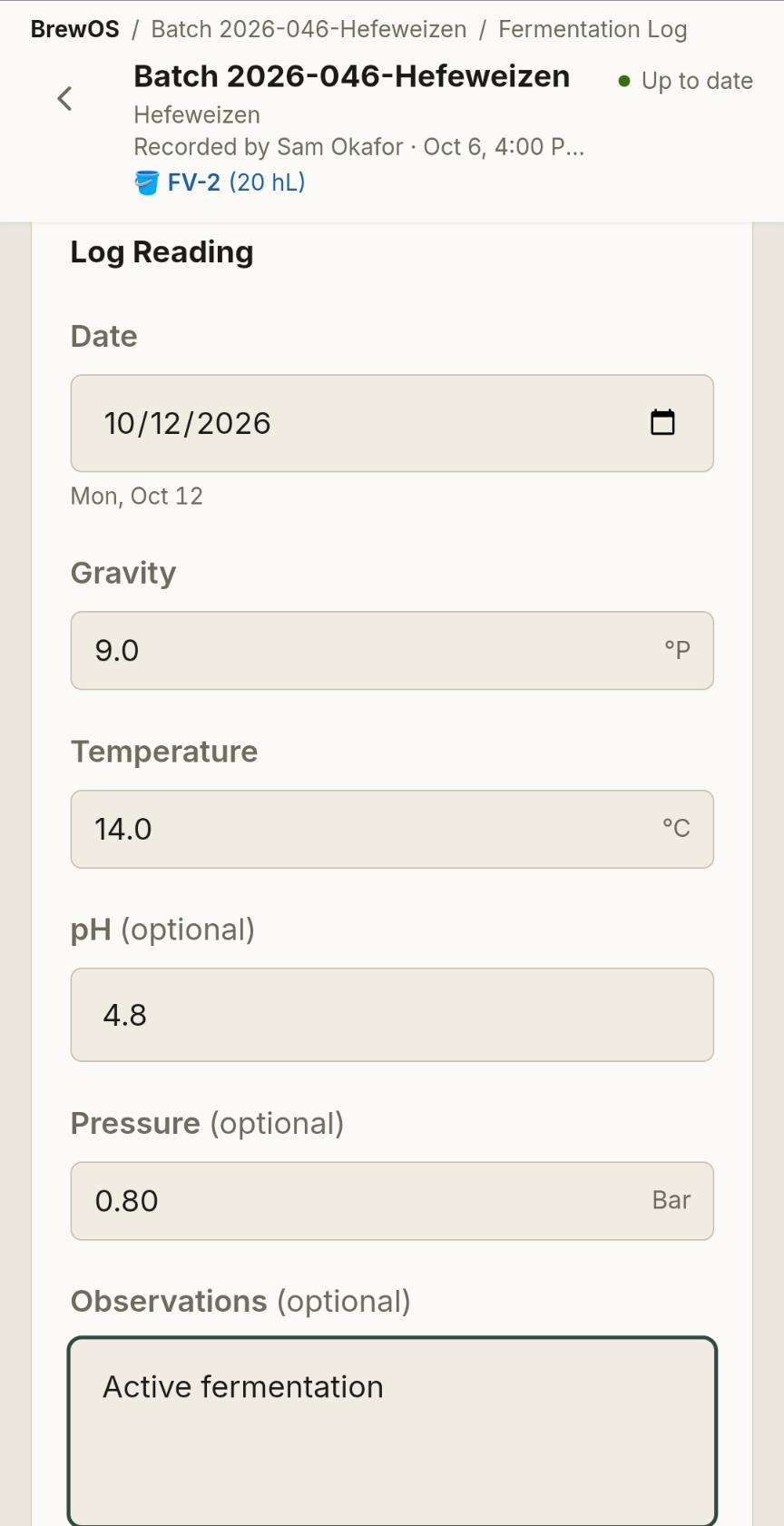
A fermentation log reading being entered on a phone: date, gravity in degrees Plato, temperature in Celsius, pH and pressure both marked optional, and an observations box reading Active fermentation
A reading going in at the tank. Gravity and temperature are asked for; pH and pressure are offered and marked optional.

Your fermenters are bigger than your brewhouse

Almost every brewery that grew bought the tank before it bought the brewhouse. Two brews of the same beer go into one fermenter — the second on top of the first, within a day or two — and from then on it's one fermentation and one diacetyl rest.

The first brew in leads. Its log is the tank's log, and a stage advance, a tank move or a conditioning-complete takes every brew in there with it. The lot that comes out names each brew and the litres it contributed. A tank already holding a different beer is refused outright.

Then at the transfer, that fermenter divides into two lagering tanks. You pick the two and say what goes into each — a share bigger than its tank, or under the tank's minimum fill, or the two adding up to more than the fermenter held, is refused. What's left over is the loss in the cone and the lines, and it's shown to you.

You state each share, because software cannot measure what stayed in the cone.

From the division on, each tank is its own beer — its own readings, its own stage moves, its own lot — each carrying the fermentation they shared before they were split, marked as shared. Change your mind before either tank has a reading in it and you can undo the whole thing.

A correction keeps what it replaced

A reading, a brew-day entry, a mash step or a cellar addition entered wrong is corrected — and the old value stays on the record, with who changed it and when. One that should never have existed is struck through rather than removed: it stays, and it comes out of every curve and every total.

The database refuses to take a recorded reading, brew-day entry, mash step or cellar addition off its batch. No screen deletes a batch. No packaging run can be deleted. A dump is never edited or deleted. A tank that has held beer is retired, never deleted.

Every record carries a name, and the name comes from the login — not from the tablet, and not from whoever happened to be standing there. On a shared tablet, saves made with no signal wait until that person signs in again, and the device says whose they are.

A fermentation log's reading history: each reading with its gravity, temperature and pH, the name of whoever recorded it and the time, and beside each one the options to correct it or mark it recorded in error
Every reading carries the person who took it. Beside each one, the two honest options — correct it, or mark it as something that should never have been recorded.

Packaging, and where the beer went

When conditioning is done, the cellar says how much bright beer is in the tank, and that becomes the tank lot. Several formats off one tank — kegs and cans from the same lot — each run with its own lot number.

You can correct a run's count. You can't quietly tune the declaration down to match it, because the gap between what the cellar declared and what came off the filler is your loss, and it's the only place that number exists.

One search box finds a lot by its tank-lot number, its beer, its tank, or a lot number exactly as printed on a keg or a can. The chain it walks back:

  1. The keg in your handType what's printed on it — L 20260914-012-01
  2. The packaging runThat day's run off the filler, and its count
  3. The tank lotFB-2026-012 — one tank, one lot, naming every brew in it
  4. The batchIts brew day, its cellar record, its recipe version

And forwards, the same chain says which customers and delivery points the rest of that lot went to.

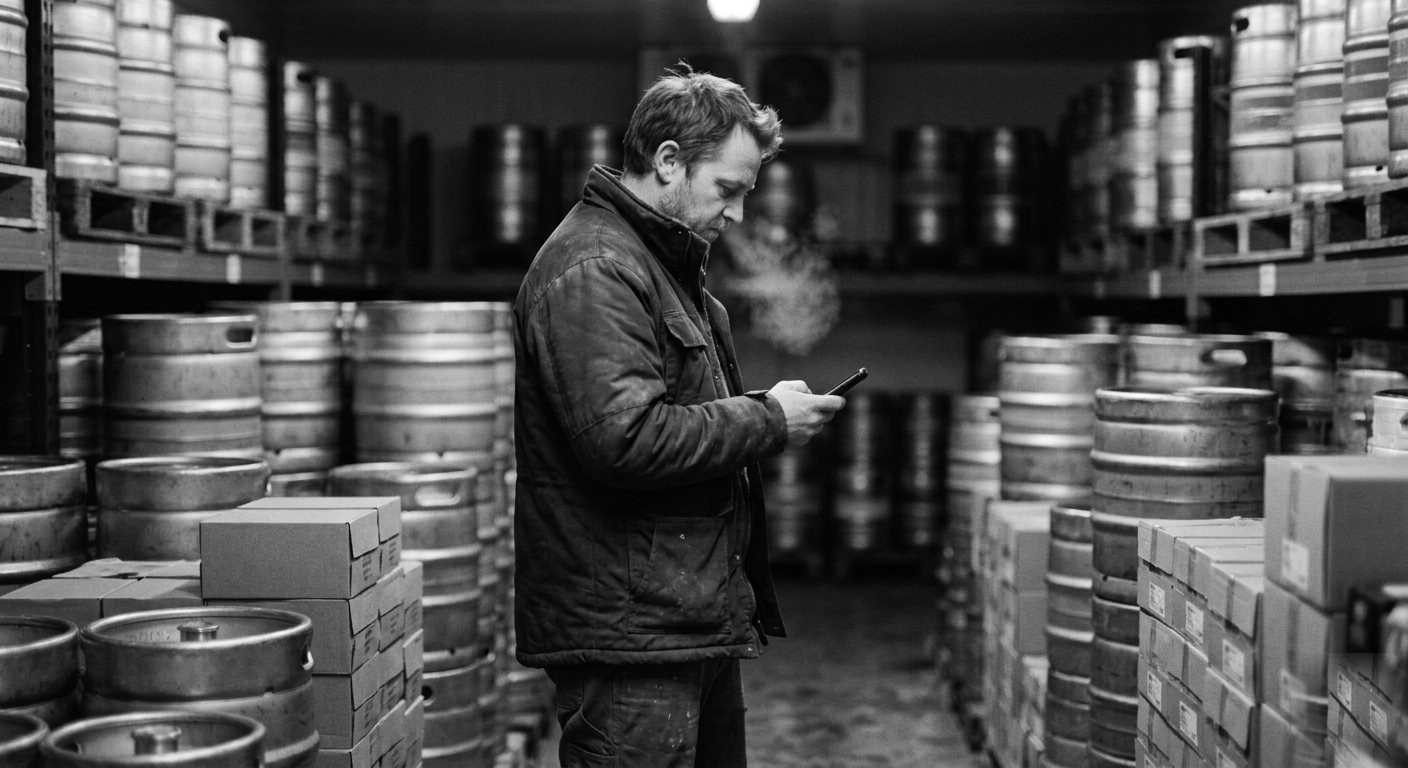
Stock in the cold room isn't a number somebody keeps overwriting. Every figure traces back to the run that filled it and everything that's happened to it since, with the packaging date and the age in days:

  • Packaged
  • Shipped
  • Sampled
  • Returned
  • Lost
  • Counted

Every sample records why it was taken. Orders close lot by lot, fulfilled or closed short with a reason, and there's an undo.

Every lot carries a best-before. You set how long the beer keeps on its recipe, and how long each container keeps in your settings; the shorter of the two decides. The cold room lists a beer's lots first-to-expire first, and flags any lot inside thirty days of its date or past it.

Each run is stamped with the shelf life it was packaged under. Decide later that the beer keeps ninety days rather than a hundred and twenty, and the kegs already in a customer's cooler keep the date they left with. A date somebody has read does not get to change afterwards.

While a run is being recorded, the screen shows the date it will carry and its lot number — ready for whatever label you already use.

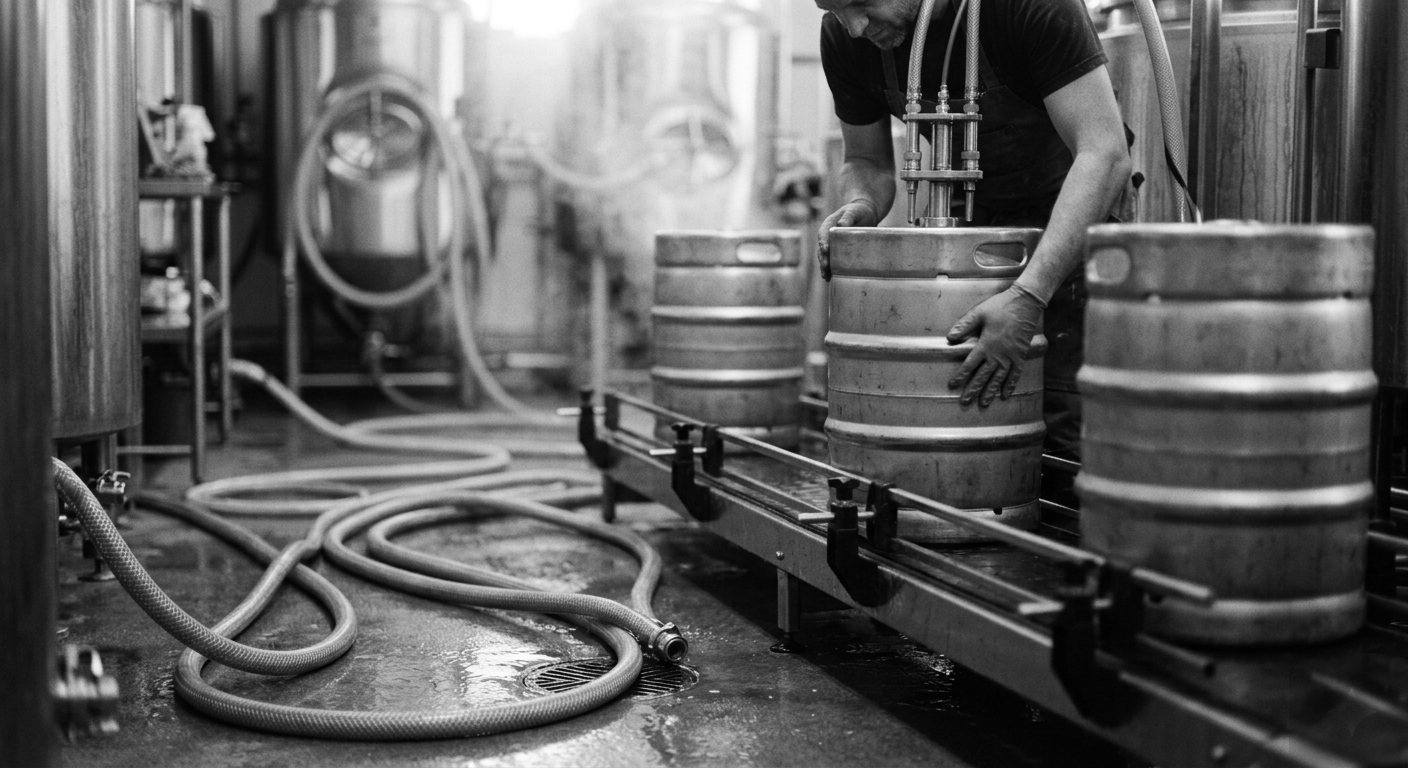
Kegs moving along the filling line A brewer counting stock among stacked kegs in the cold room

The plan, and the week

Orders go in with their dates and how firm they are — committed, anticipated, opportunistic. BrewOS works backwards through each recipe's stages against your brewhouse hours, your tanks by type, your packaging line, the buffer days you keep before a promised date, and your own measured stage times and losses.

It plans only against beer you've actually promised. Brewing runs on a horizon of one to three months and sales orders run on one of days. A system that drives your brewhouse off next week's orders is pretending those line up, and the brewery pays for the pretence in beer that's either late or old.

When you're short it lays out the ways through, ranked by how firm the orders are. It never offers the committed order as the one to cut. There's no money in it anywhere; the value judgment stays yours.

Where there's a fix, the card says it in a sentence. Plan it as three separate lots. Brewing 13 hL would fit. No button changes your plan on your behalf.

Publish, and the near weeks land on the schedule your crew reads. Move a brew on the floor and the plan follows — it keeps the day the plan had, who moved it and when, and publishing again never overwrites what the floor changed. The recipe's own cellar work turns up there by itself: the dry hops, the move to maturation, the crash, ready to package. Nobody has to write them on the board.

Every Go, No-Go and deferral is kept with what it replaced, who gave it and when — and each new plan says in words what changed since the last one. Months later you can see what you decided, and why.

The outlook deck opens full screen for a meeting: the load, the wall, capacity, headroom, and the raw materials the plan will consume — planned consumption, not a purchase plan — exported as a spreadsheet in the reader's language and units.

Sensory analysis

Seven methods, each answering a different question — with the result worked out from the answers rather than argued in the room.

Triangle
Is there a difference at all?
Duo-trio
Which of these two matches the reference?
Recognition
Can you name what's in the glass?
Ranking
Put these in order — most to least.
Threshold
At what level does it start to show?
Descriptive profile
What exactly are we tasting, and how much?
DLG quality scheme
How does it score, point by point?

Difference tests by exact binomial significance, with the share of discriminators. Ranking by Friedman and Page. Threshold by the ASTM E679 best-estimate method. Profile and DLG by analysis of variance, DLG carrying its weighted overall score. Every verdict is rebuilt from the numbers, in the reader's language.

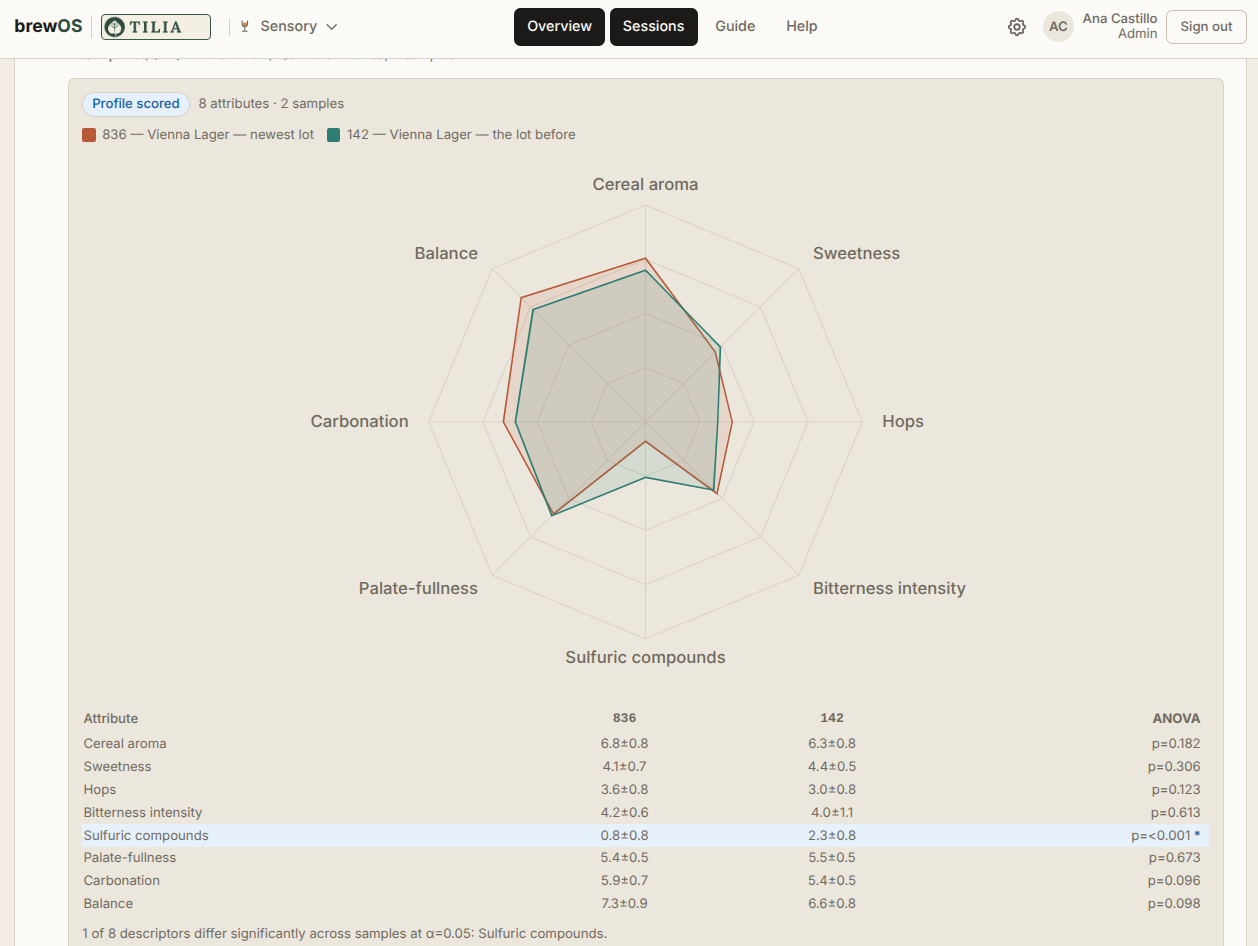
A profile comes out as a radar chart — each sample's panel mean, descriptor by descriptor — on the result and on the session report.

Panelists join with a code on their own phones, no login. Answers given without signal arrive when the phone reconnects. Every sample carries only its blind code; the key stays with whoever is running the session.

Panels, panelist groups, a standards library and your own descriptor vocabulary. Run sheets and blind packs print for every method.

And the guide is right there — method guides, worked examples and reference tables, with coaching along the way. In all five languages.

A descriptive profile result: a radar chart of two samples scored across eight attributes, above a table of the panel means with an analysis of variance for each attribute
Two samples, eight descriptors, the panel's mean for each — and underneath, which of those differences the numbers will actually stand behind. Here, one of the eight.

It works where you work

English, Spanish, Portuguese, German and French — every screen, not just the menus. Everyone picks their own; the sensory sessions and the whole guide come too. Spanish addresses you as usted, Portuguese as você, German as Sie, French as vous, and every date is written out in words in your own language.

Metric or US. A US brewery works in US units — specific gravity, °F, gallons and barrels, pounds, PSI, SRM for the beer and °Lovibond for the malt — through recipes, brew day, the cellar, packaging, the cold room, planning and the calculators. Kegs and cans come with the US sizes already in them.

The floor is on phones: readings at the tank, brew day, the mash, the lauter log, and your own tasks for the weeks ahead. It installs like an app, and it's built to keep recording where the signal gives out — between the tanks, at the back of the cellar, beside the filler — sending what you logged once you're back in range.

Planning is the one job that stays at the desk: once a week, on a big screen, with the months ahead laid out in front of you.

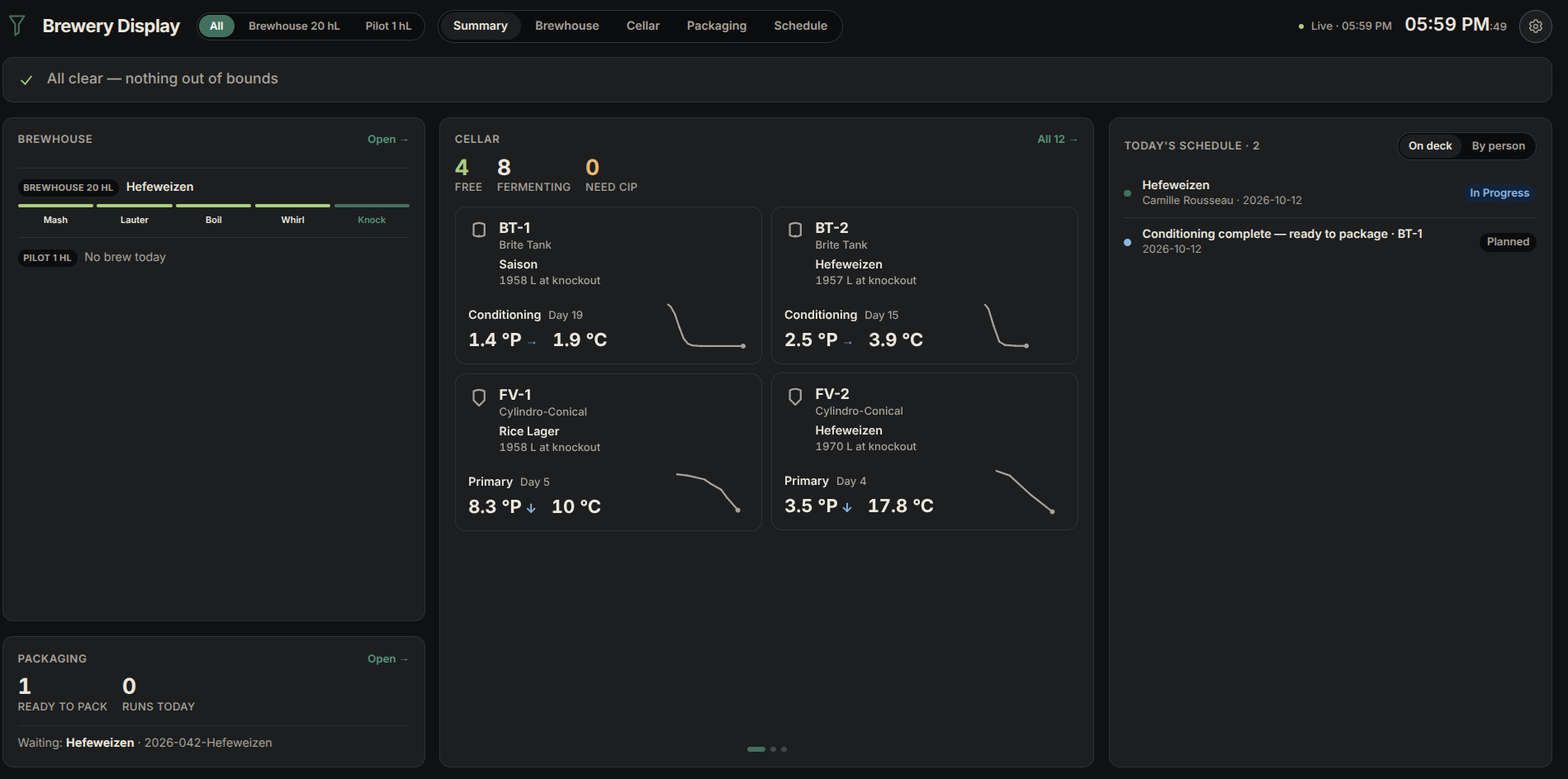
There's a wall board for the screen by the door, refreshing every minute — the brewhouse with how far each brew has got, each tank with its stage, day, latest gravity and its curve, what's ready to package, the week, and a strip that flags any reading out of range. A tile says when a tank hasn't been read for days. Dark for the floor, or light.

In the morning meeting, a task moves to Now, Next or Done with your own PIN — and the board says who moved it.

The Brewery Display on a dark floor theme: the brewhouse with how far the brew has got, the cellar with four tanks each naming its beer, its stage, day, gravity, temperature and a gravity curve, packaging, and today's schedule

The board by the door, on the floor's dark theme. Four tanks a page, each naming its beer and how far it has dropped.


Where it sits

BrewOS runs the brewery. It doesn't do the books.

Every brewery is a business, and a business carries costs, books, sales, forecasts, stock and payroll. There's good software for all of it, written by people who have spent careers on that problem and know it far better than we do.

Some of it tries to run the brewery as well. You can have one system that does both — it just won't be the best at either. Usually it's an accounting system with a brewing screen bolted on, and you can tell which half came second.

There's also the part nobody gets to choose. Invoicing and reporting have to satisfy whoever regulates them where you are, and a system that wasn't built for your country is an expensive place to discover that. All of that is settled long before anyone asks what runs the brewery. Two different decisions.

So there's no money in BrewOS anywhere — no price, no cost, not a currency symbol on any screen. A report will tell you what two more fermenters buy you in hectolitres a month. It will never tell you what they cost, because that isn't a question a production system should be answering.

BrewOS keeps the brewery. The ERP keeps the books.

We'd rather be the best thing a brewery puts on its floor than the fourth-best thing it puts in its office.


What we're working on

On our roadmap.

Not built, not dated, and not promised. But you should know where this is going — and founding breweries get a say in what comes first.

Yeast records
Following each yeast through its generations — which tank every pitch was harvested from, its generation and viability, and the pitch rate from a cell count.
A quality record for every lot
The forced-fermentation result, dissolved oxygen at transfer and packaging, and the cleaning behind every tank: chemical, concentration, temperature, time, who, and its verification.
Blending, and dividing at knockout
Blending two lots into one tank, and dividing a brew at knockout — with every share and its history kept.
A wall display you can work from
The wall display becomes a place to work — mark a tank emptied, start a CIP, log a reading or acknowledge an alert from the board, with your PIN.
Mash pH, planned against measured
The mash pH the recipe plans for, beside the one measured on brew day.
Sensory reports
Sensory session reports to print and share, and a beer's results compared across sessions.
Calendar sync
The brewery's schedule in Google Calendar, Outlook or any calendar — for the people who never open BrewOS.
An SOP companion
Standard Operating Procedures without the blank page — a starting outline, the published references beside it, and a one-pager for the wall by the tank. Every brewery knows it should have SOPs. Most have three, all out of date.